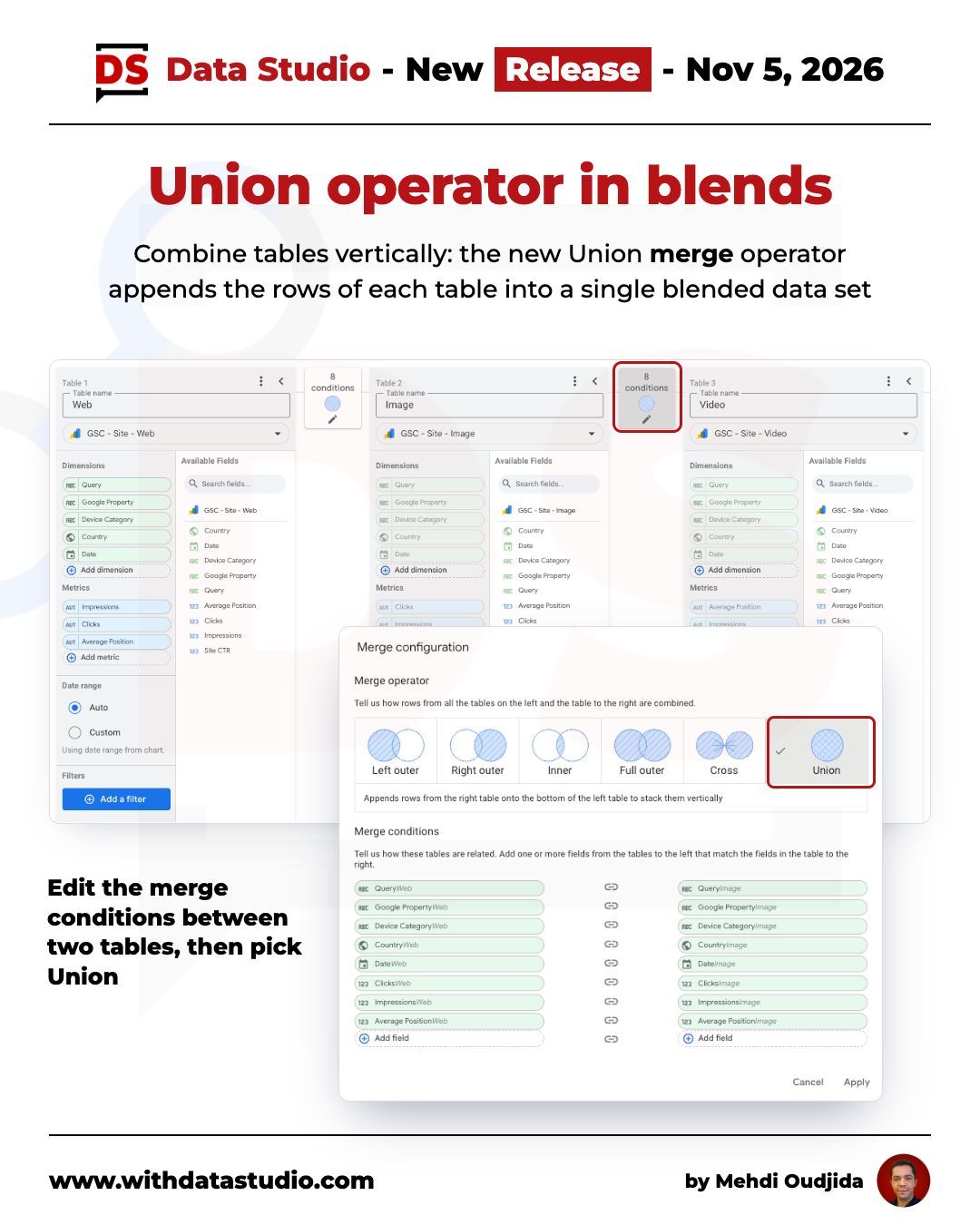
The new UNION operator combines tables vertically. Joins were already available and combine them horizontally.
Google renamed "join" to "merge", since the term now covers both blend types.
Watch out: this is a true UNION, not UNION ALL. Rows shared by the tables get deduplicated. To keep every row, add a static dimension, for example the table name.
The lower part of the merge setup lets you map fields across sources that don't share the same data model.
Spotted by Mehdi Oudjida
What changed
Looker Studio blends can now stack data sources on top of each other. A new UNION operator combines tables vertically, while the existing joins combine them side by side. Google renamed "join" to "merge" because the term now covers both blend types. The new union works as a true UNION, so rows that appear in more than one table are removed. The merge setup also lets you map fields between sources that do not use the same data model.
What this means for ecommerce accounts
If you report on Google Ads, Merchant Center or GA4 data in Looker Studio, you can now build one blend from several sources stacked on top of each other. This is useful when you want one table that covers, for example, two accounts or two periods. The change is about reporting in Looker Studio, not about how Shopping, Performance Max or Search campaigns run. Because the union removes duplicate rows, a blend of similar data can show fewer rows than you expect. If you need every row, add a static dimension such as the table name, so each row stays unique.
The field mapping at the bottom of the merge setup helps when your sources name the same thing differently. You can match fields across sources that do not share the same structure. Check your existing blends after the rename, since the screens and labels now use the word merge.
What to do now
- Open your existing blends and check that the labels now say merge, so you know which blend type you are editing.
- Before you stack two sources with UNION, count the rows in each source and in the result, so you can spot removed duplicates.
- Add a static dimension such as the table name to each source if you need to keep every row.
- Use the field mapping at the bottom of the merge setup to match fields that have different names across sources.
- Test the blend with a short date range first, and compare the totals with the individual sources.
FAQ
What is the difference between a UNION and a join in Looker Studio blends?
A UNION combines tables vertically, stacking rows on top of each other. A join combines tables horizontally, placing fields side by side. Google now calls both blend types merges.
Why are some of my rows missing after a union?
The union is a true UNION, not UNION ALL. Rows that are shared by the tables are deduplicated, so they appear only once. Adding a static dimension such as the table name keeps every row distinct.
Why did the join option change its name to merge?
Google renamed join to merge because the term now covers both the horizontal join and the new vertical union blend types.
Want this checked in your own account? I manage Google Ads for ecommerce brands that spend €10K or more a month. In a free 30-minute quick scan we look at your account together.
Book a free quick scanNew to a term? See the Google Ads glossary.