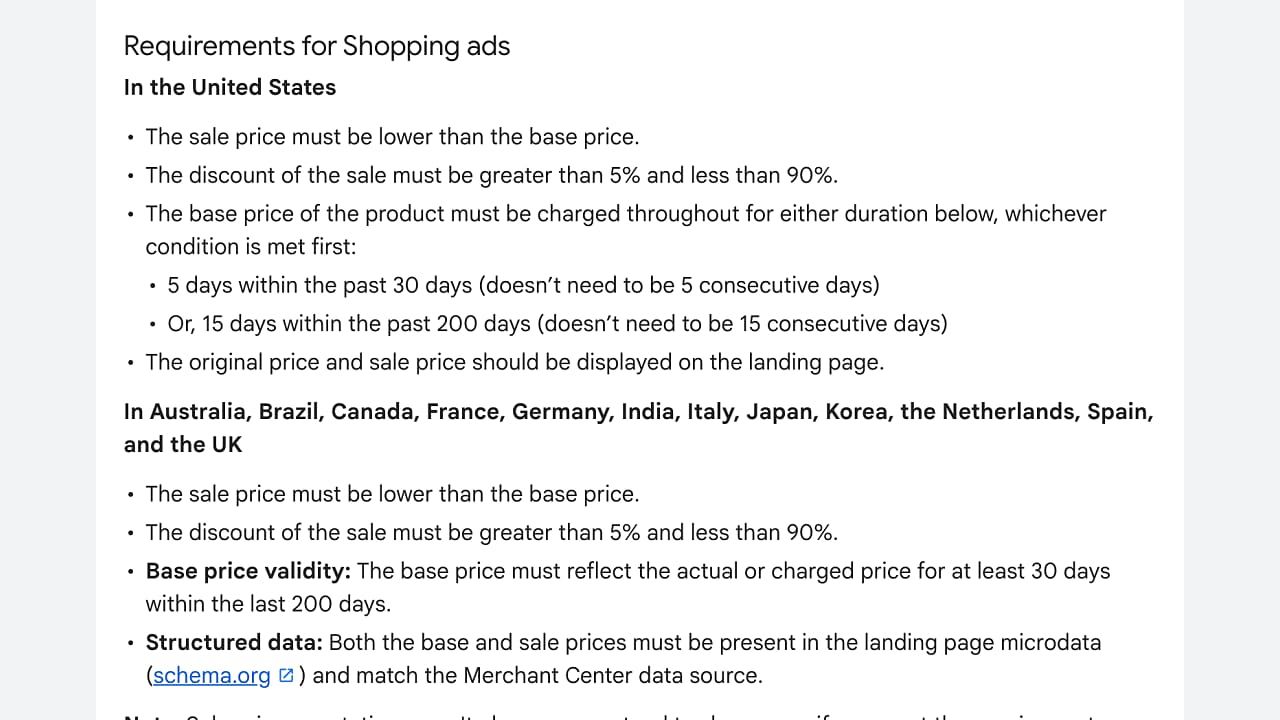
Both the base price and the sale price must be in your schema.org markup. Until now, showing both prices on the landing page was the focus. The markup must also match your Merchant Center data source.
It applies to 12 markets, including Australia, Brazil and Canada. Google hasn't named an enforcement date.
The other rules in Merchant Center Help:
the sale price must be 5% to 90% below the base price
the base price must have been charged for 30 days within the last 200 days
Watch out: if your theme or platform only outputs one price in the markup, or it differs from your feed, your sale price annotations are at risk.
Spotted by Thomas Eccel, via PPC News Feed.
What changed
Google now requires sale price annotations in Shopping ads to be supported by schema.org structured data on your landing page. Both the base price and the sale price must appear in that markup. The markup must also match the price data in your Merchant Center data source. Until now, showing both prices on the page was the main focus. The rule applies in 12 markets, including Australia, Brazil and Canada.
What this means for ecommerce accounts
If you run Shopping ads with sale price annotations, check the markup on every product page you advertise. Both prices need to be there, and they need to match your Merchant Center feed. This matters most for ecommerce stores where the theme or platform outputs only one price in the markup, or outputs a price that differs from the feed. Those annotations are at risk. Performance Max also serves Shopping ads, so the same check applies to any Performance Max campaigns that show Shopping inventory with sale prices.
The rule covers the 12 markets named in this update. If you sell in other countries, it does not say whether the rule applies there. Google has not named an enforcement date, so there is time to prepare, but I would not wait. The other sale price rules still apply too: the sale price must be 5% to 90% below the base price, and the base price must have been charged for 30 days within the last 200 days.
What to do now
- Open a few product pages with sale prices and check the schema.org markup for both the base price and the sale price.
- Compare the prices in the markup with the prices in your Merchant Center data source for the same products.
- Ask your developer or platform provider to output both prices in the markup if only one is shown.
- Check that each sale price is 5% to 90% below the base price and that the base price was charged for 30 days within the last 200 days.
- Recheck your sale price annotations after the fixes and watch Merchant Center for any warnings.
FAQ
Do I need structured data for sale price annotations in Shopping ads?
Yes, according to this update. Both the base price and the sale price must be in your schema.org markup on the landing page. The markup must also match the price data in your Merchant Center data source. Showing both prices visibly on the page is no longer enough on its own.
Which countries does the structured data rule apply to?
The rule applies in 12 markets, including Australia, Brazil and Canada. Check Merchant Center Help for the full list of markets before you assume it applies to yours.
What happens if my theme only shows one price in the markup?
This update warns that your sale price annotations are at risk. The markup needs both the base price and the sale price, so a theme or platform that outputs only one price should be fixed.
Want this checked in your own account? I manage Google Ads for ecommerce brands that spend €10K or more a month. In a free 30-minute quick scan we look at your account together.
Book a free quick scanNew to a term? See the Google Ads glossary.