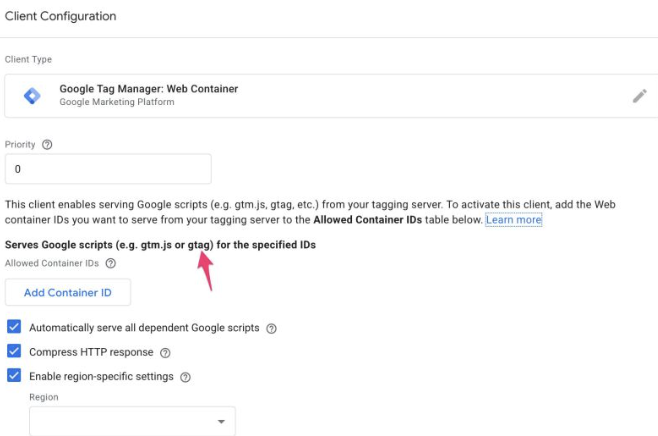
Previously, the GA4 Client in SGTM could directly load gtag.js. That’s no longer possible. Now, all Google JavaScript libraries are loaded via the Web Container Client.
If you want to load gtag.js via SGTM, you must now use a Web Container Client and allowlist the Google Tag Measurement IDs you want to serve.If you load GTM through SGTM using the Web Container Client, you can enable “Automatically serve all dependent Google scripts”, so any Google Tags in that GTM web container will be served automatically—no manual Measurement ID list needed.
You don’t have to serve a full GTM container through SGTM you can still use the Web Container Client solely to load gtag.js by specifying allowed Measurement IDs.
For more information check Simo Ahava his post.

What changed
The GA4 Client in server-side Google Tag Manager (SGTM) can no longer load gtag.js directly. All Google JavaScript libraries are now loaded through the Web Container Client. To load gtag.js through SGTM, you need a Web Container Client that allowlists the Google Tag Measurement IDs you want to serve. If you load a full GTM web container through SGTM, you can turn on automatic serving of dependent Google scripts instead of listing IDs by hand.
What this means for ecommerce accounts
This matters if your tracking depends on server-side GTM to deliver gtag.js. For ecommerce advertisers, the setup that feeds your Google Ads and GA4 tags may need to change, even if your campaigns look the same in Shopping, Performance Max or Search. Check how gtag.js is currently loaded in your SGTM setup before you change anything.
You can use the Web Container Client only to load gtag.js, without serving a full GTM container. In that case, you list the Measurement IDs you want to allow. If you already serve a full GTM web container through SGTM, the automatic option may be simpler, because any Google Tags in that container are served without a manual list. If your setup loads tags only in the browser, this change does not affect you.
What to do now
- Check whether your SGTM container loads gtag.js through the GA4 Client.
- If it does, add a Web Container Client and allowlist each Measurement ID you need.
- If you serve a full GTM web container through SGTM, turn on automatic serving of dependent Google scripts.
- Test your tags after the change and confirm that hits still arrive in GA4 and Google Ads.
- Read Simo Ahava's post on the topic for the full technical details.
FAQ
Can the GA4 Client in SGTM still load gtag.js directly?
No. According to this change, the GA4 Client can no longer load gtag.js directly. All Google JavaScript libraries are now loaded through the Web Container Client, so you need that client to serve gtag.js through SGTM.
Do I need to serve a full GTM container through SGTM to load gtag.js?
No. You can use the Web Container Client only to load gtag.js by specifying the Measurement IDs you want to allow. Serving a full GTM web container is optional.
What is the automatic option for serving Google scripts in SGTM?
If you load GTM through SGTM with the Web Container Client, you can enable Automatically serve all dependent Google scripts. Any Google Tags in that web container are then served without a manual Measurement ID list.
Want this checked in your own account? I manage Google Ads for ecommerce brands that spend €10K or more a month. In a free 30-minute quick scan we look at your account together.
Book a free quick scanNew to a term? See the Google Ads glossary.