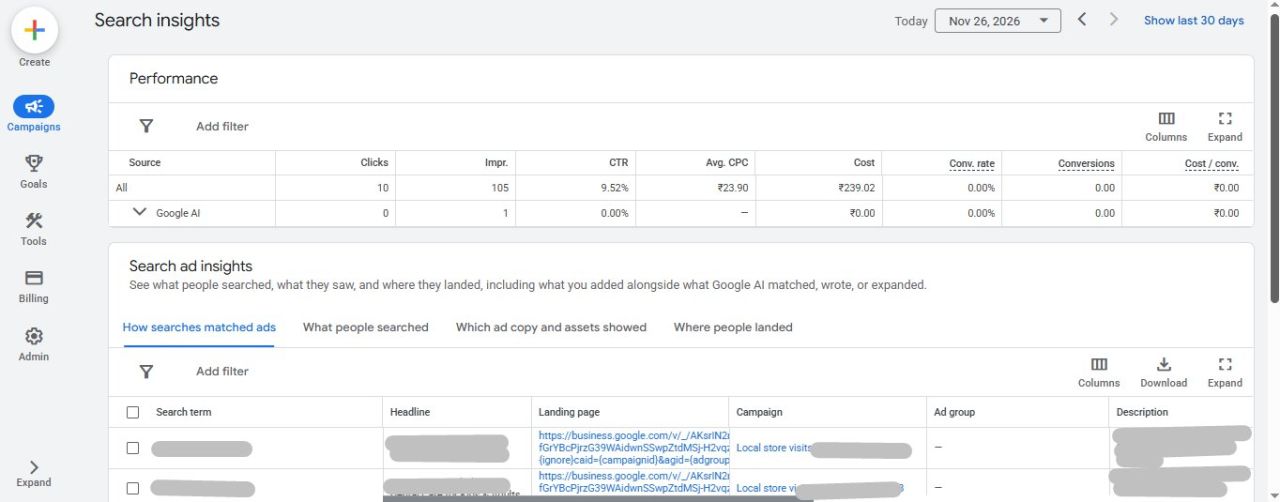
Per search it shows:
how the search matched your ads
which ad copy and assets showed
where people landed
A separate tab covers trends for your topic. You see indexed search volume over 3 years, plus queries labeled Top, Rising, Emerging, Sustained or Declining.
Watch out: topics are built from user click behavior, not exact terms. Audience filters like age or gender don't apply. Data is usually country-level only.
It's already visible in live accounts. No word yet on a wider rollout.
Spotted by Govind Singh, via Barry Schwartz.
What changed
Google Ads now has a Search Insights report. For each search, it shows how the search matched your ads, which ad copy and assets showed, and where people landed. A separate tab shows trends for a topic: indexed search volume over 3 years, and queries labeled Top, Rising, Emerging, Sustained or Declining. This update is already visible in some live accounts. Govind Singh spotted it, and Barry Schwartz reported on it.
What this means for ecommerce accounts
This update gives ecommerce advertisers a closer look at what shoppers search for and how those searches reach their ads. It helps you see which ad copy and assets were shown for a search, and where that visitor landed on your site. The trend tab can help you spot rising or declining interest in a product category before you change budgets or feeds. Keep in mind that topics are built from user click behavior, not exact search terms, so they show patterns rather than precise query counts. Audience filters such as age or gender do not apply, and the data is usually at country level only. For Shopping and Performance Max, this update is most useful for the search side of the picture and for landing page checks, since Performance Max also serves Shopping ads. Check your account to see whether this update is available to you yet.
If you already run Search campaigns, this update is a good addition to your regular reviews. It does not replace your own search term reports, which show the exact queries that triggered your ads.
What to do now
- Open your account and check whether the Search Insights report is available to you.
- Review which ad copy and assets matched the searches that led to your best sales.
- Check the landing pages for top searches to confirm they match what the shopper searched for.
- Use the trend labels to find rising product topics before you adjust budgets or product feeds.
- Keep your exact search term reports as well, since topics do not show exact queries.
FAQ
What is the Search Insights report in Google Ads?
It shows, for each search, how the search matched your ads, which ad copy and assets showed, and where people landed. A separate tab covers topic trends, with indexed search volume over 3 years and labels such as Top, Rising, Emerging, Sustained or Declining. It is already visible in some live accounts.
Can I filter Search Insights by age or gender?
No. Audience filters like age or gender do not apply to this update. The data is usually available at country level only.
Do Search Insights topics show exact search terms?
No. Topics are built from user click behavior, not exact terms. Use them to spot patterns, and use your search term reports for the exact queries that triggered your ads.
- Insights in YouTube Search terms 10 Aug 2025
- New auction insights 9 Mar 2025
- TikTok launches Creator Search Insights 15 Mar 2024
Want this checked in your own account? I manage Google Ads for ecommerce brands that spend €10K or more a month. In a free 30-minute quick scan we look at your account together.
Book a free quick scanNew to a term? See the Google Ads glossary.