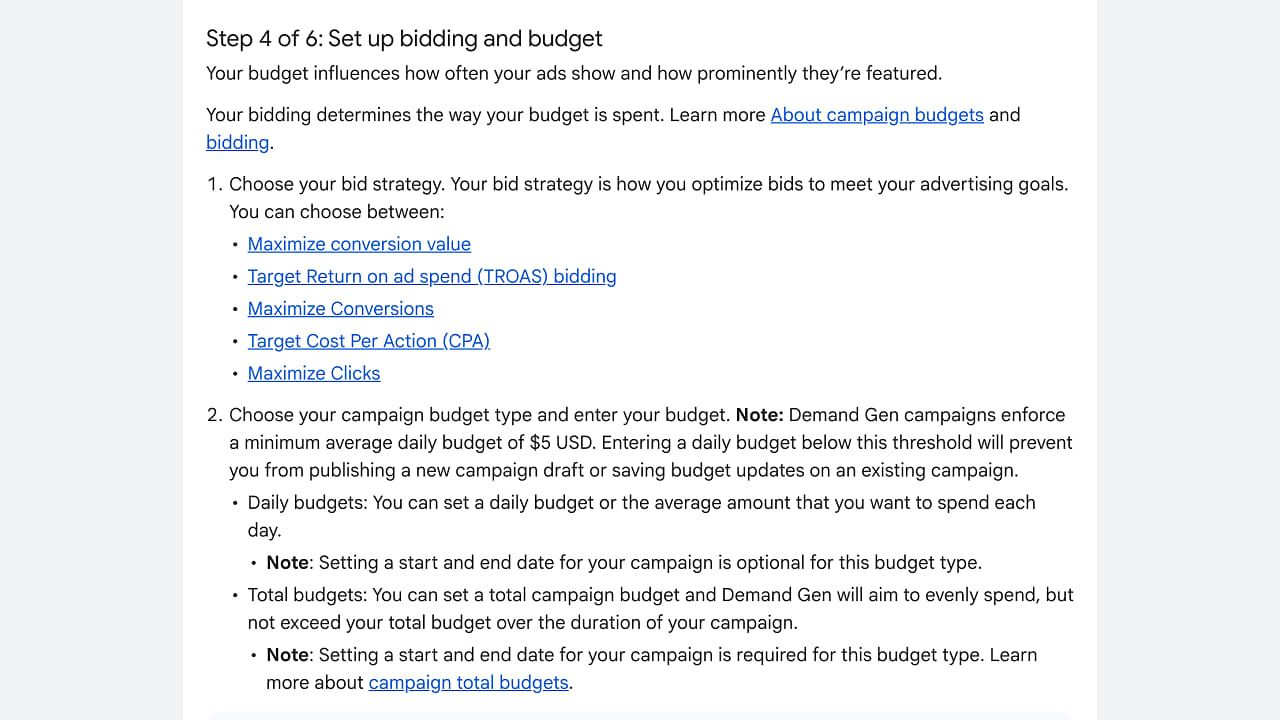
Google's help pages changed on November 19. A draft under $5 can't be published. On existing campaigns below the limit, budget changes can't be saved.
This comes on top of Google's advice to start with a budget at least 10 times your target CPA for Smart Bidding.
Watch out: Google doesn't list the minimum in other currencies, so the threshold outside the US may differ.
My tip: if you run small test budgets in Demand Gen, check them now so you can still edit them.
Spotted by Thomas Eccel, via Hana Kobzová.
What changed
Google's help pages were updated on November 19 with a new rule for Demand Gen campaigns. A campaign draft with a daily budget under $5 can no longer be published. On campaigns that already exist, you cannot save a budget change if the new budget is below $5. This update also notes that Google does not list the minimum in other currencies, so the threshold outside the US may be different.
What this means for ecommerce accounts
If you run Demand Gen campaigns with small test budgets, this rule affects you directly. Drafts with a daily budget under $5 will not publish, so you need to raise the budget before you launch. Existing campaigns below the limit will also block your edits, so check them before you need to change anything.
The $5 figure is in US dollars. Since Google does not state the minimum for other currencies, check the budget settings for your own currency in your account instead of assuming the same amount applies. This rule is specific to Demand Gen as far as this update says, so it does not describe the budget rules for Search, Shopping or Performance Max. Also keep Google's advice in mind: for Smart Bidding, start with a budget at least 10 times your target CPA.
What to do now
- List all Demand Gen campaigns in your account and note their current daily budgets.
- Check whether any of those budgets are below $5, or the equivalent in your currency if you are not in the US.
- Raise the budget on any campaign that is below the limit now, while you can still save changes.
- Before you launch a new Demand Gen draft, confirm the daily budget meets the minimum so it can be published.
- Set a reminder to check the budget settings again, since Google does not list the minimum for other currencies.
FAQ
What is the new minimum daily budget for Demand Gen campaigns?
The minimum daily budget for Demand Gen campaigns is $5. A campaign draft with a lower daily budget cannot be published. On existing campaigns below the limit, budget changes cannot be saved until the budget is raised to at least $5.
Does the $5 minimum apply to my currency?
The amount in US dollars. Google does not list the minimum in other currencies, so the threshold outside the US may be different. Check your account's budget settings to confirm the limit for your currency.
Can I still edit a Demand Gen campaign with a small budget?
Not if the daily budget is below the minimum. Budget changes on existing campaigns below the limit cannot be saved. Raise the budget to the minimum first, then make your other edits.
Want this checked in your own account? I manage Google Ads for ecommerce brands that spend €10K or more a month. In a free 30-minute quick scan we look at your account together.
Book a free quick scanNew to a term? See the Google Ads glossary.