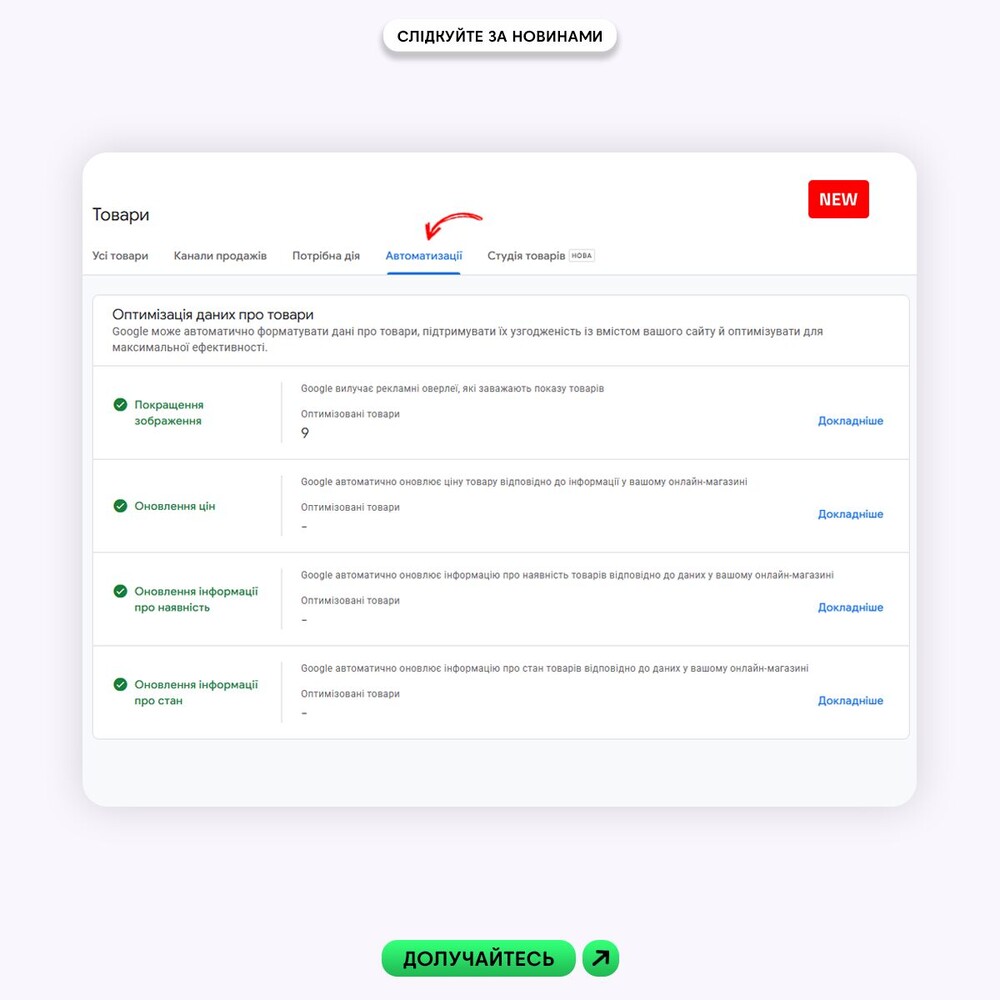
Igor Pecherskih & Hana Kobzová discovered that the automatic improvements page has received an update.
Now it is called “Automation”. The interface has been changed and now the number of items that have been updated is displayed.
For those who don’t know, this page can be set up to automatically update product data, such as image improvements, pricing, availability, and status updates.

What changed
The automatic improvements page in Google Ads has been renamed to Automation. The interface has also changed, and the page now shows how many items have been updated. The page can be set up to update product data automatically, including image improvements, pricing, availability, and status updates. Igor Pecherskih and Hana Kobzová spotted the change.
What this means for ecommerce accounts
If you run Shopping campaigns, this page matters because it can change your product data without you editing the feed by hand. Performance Max also serves Shopping ads, so changes to Shopping ads usually also apply to Performance Max. Check the Automation page to see which automatic updates are switched on for your account, since a setting you forgot about can change prices, availability or images in your listings. This update does not cover Search, Microsoft Ads or Meta Ads, so this update does not tell you anything about those platforms.
The update itself is mainly a rename and an interface change, so it does not change what the feature does. What matters for you is the count of updated items. It gives a quick way to see how many products were changed by automation, which helps you spot unexpected changes early.
What to do now
- Open the Automation page in your Google Ads account and check which automatic updates are turned on.
- Compare the list of updates with your product feed, especially prices, availability and status.
- Check the count of updated items after each big feed change to see if automation changed more than you expected.
- Review your Shopping and Performance Max campaigns for any products that look wrong after an automatic update.
FAQ
What is the Automation page in Google Ads?
The Automation page is the new name for the automatic improvements page. It can be set up to automatically update product data such as image improvements, pricing, availability, and status updates. The interface has changed, and it now shows how many items have been updated.
Does the Automation page affect Performance Max?
Performance Max also serves Shopping ads, so changes to Shopping ads usually also apply to Performance Max. This update describes the automatic updates for product data, which are tied to Shopping. Check the page in your own account to see which updates apply to your campaigns.
Who found the update to the automatic improvements page?
Igor Pecherskih and Hana Kobzová discovered that the automatic improvements page has received an update. They noticed the new name Automation, the changed interface and the display of how many items have been updated.
- Improvements to the ChatGPT search response quality 22 Jun 2025
- Improvements to Auto optimize 17 May 2025
- Google just rolled out two key improvements 13 May 2025
Want this checked in your own account? I manage Google Ads for ecommerce brands that spend €10K or more a month. In a free 30-minute quick scan we look at your account together.
Book a free quick scanNew to a term? See the Google Ads glossary.