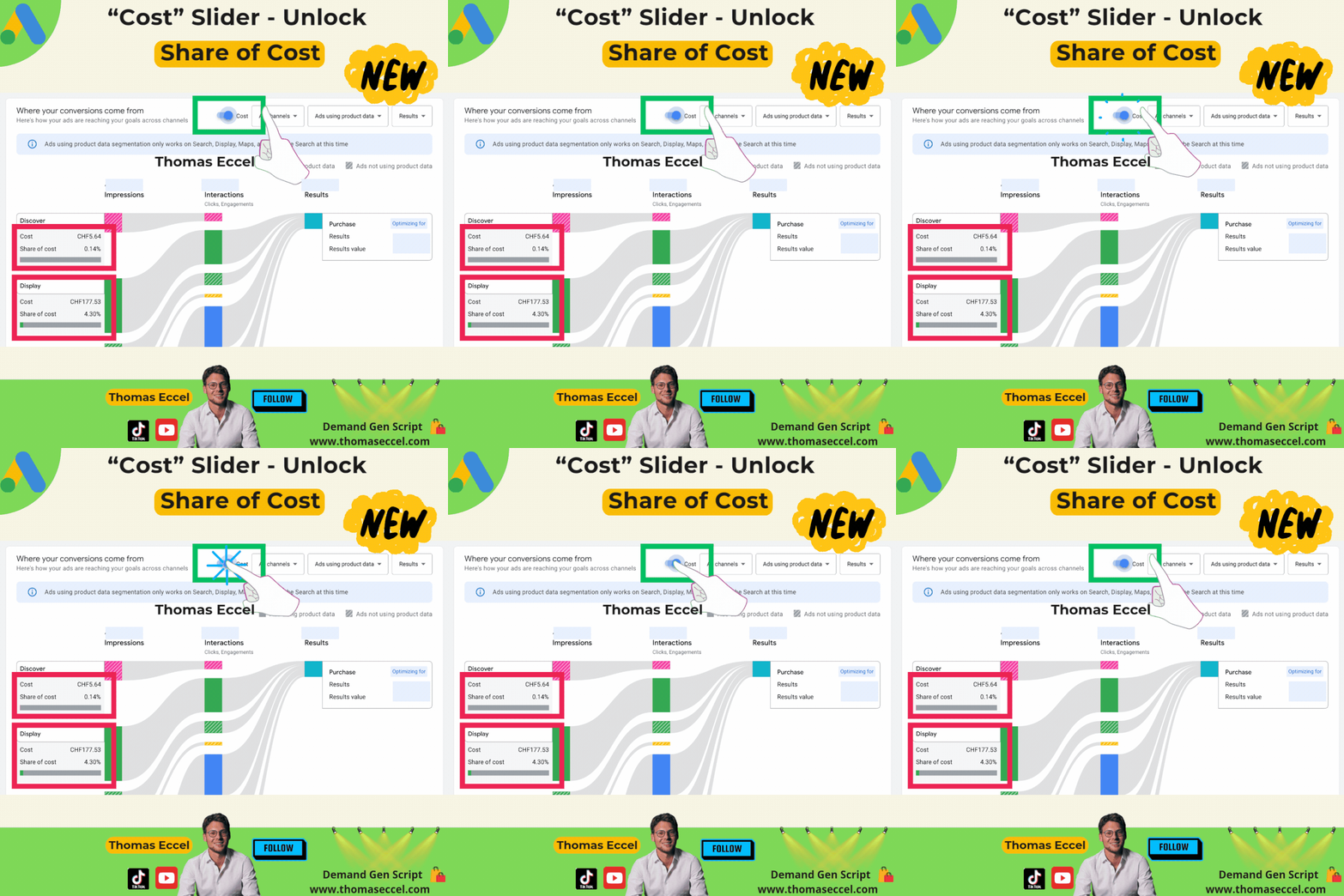
Thomas Eccel discovered that Google Ads has improved the Performance Max Channel Reporting beta by adding a cost slider that reveals each channel’s share of total campaign spend.
When you activate the slider, Google calculates and displays the percentage of cost attributed to each channel, making it easier to see where your PMax budget is going.

What changed
Google Ads has added a cost slider to the Performance Max Channel Reporting beta. When the slider is on, this update shows the share of total campaign spend for each channel. Thomas Eccel found the change. The slider makes it easier to see how much of a Performance Max budget goes to each channel.
What this means for ecommerce accounts
For ecommerce advertisers, this makes channel spend in Performance Max easier to read. Performance Max also serves Shopping ads, so the cost split you see may include Shopping spend as well as other channels. Use it to check whether the budget goes where you expect, for example to Shopping, Search, or other placements.
This does not change how Search or standalone Shopping campaigns work, since it only applies to Performance Max channel reporting. It also only helps if you can access the beta report. Check the Performance Max channel reporting view in your account to see whether the slider is available to you.
What to do now
- Open the Performance Max channel reporting view in your account and check whether the cost slider is available.
- Turn on the slider and note the percentage of spend for each channel in your campaigns.
- Compare the channel split with your goals, such as whether most spend goes to Shopping.
- Record the split each week so you can spot shifts after changes to your budget or assets.
- If a channel takes more spend than you want, review your feeds, audience signals, and campaign settings before making changes.
FAQ
What is the Performance Max cost slider?
It is a new slider in the Performance Max Channel Reporting beta. When you turn it on, this update shows each channel's share of total campaign spend as a percentage. Thomas Eccel discovered the change, and it helps you see where your Performance Max budget goes.
Does the cost slider show Shopping spend in Performance Max?
This update does not list each channel by name, but Performance Max also serves Shopping ads. So Shopping spend is likely part of the channel split you see. Check the channel report in your account to confirm which channels appear.
Does this change affect Search campaigns?
This change applies to the Performance Max Channel Reporting beta. It does not change how standalone Search campaigns report spend. Check your Search reports directly if you want to confirm their current view.
Want this checked in your own account? I manage Google Ads for ecommerce brands that spend €10K or more a month. In a free 30-minute quick scan we look at your account together.
Book a free quick scanNew to a term? See the Google Ads glossary.