Google Ads News
Video asset section

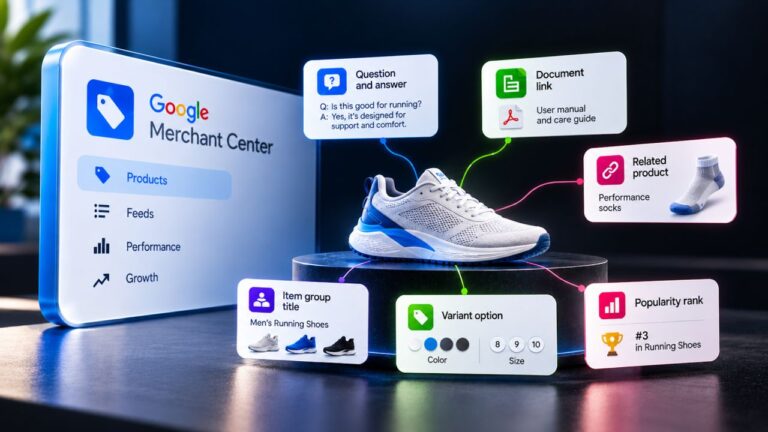
Google has started automatically filling the Video assets section in Google Merchant Center Next, which previously appeared empty in many accounts despite launching in September 2025.
Videos are now being pulled in from external sources, primarily connected YouTube channels, confirming Google’s plan announced at Google Marketing Live 2025 to create a centralized video asset hub inside Merchant Center.
This signals Merchant Center’s evolution from a feed management tool into a unified creative library powering Shopping, Performance Max, and future AI-driven shopping experiences.
Advertiser takeaway: YouTube and website videos may now automatically become usable ad creatives, making video governance and channel strategy increasingly important.
Source: Hana Kobzová
Demand Gen Drops

Google’s latest Demand Gen insights show advertisers applying key best practices see 40%+ more conversions on average.
Here are practical tips you can apply today 👇
1. Let AI find your next customers Use optimized targeting, Lookalikes, and New Customer Acquisition goals instead of overly restricting audiences.
2. Use performance-focused bidding. Switch to tCPA or tROAS and plan budgets with Performance Planner to give campaigns room to learn and scale.
3. Strengthen your creatives. Aim for Excellent Ad Strength. Provide multiple images, videos, headlines, and descriptions so Google AI can optimize combinations.
4. Fix your data foundation. Implement sitewide tagging and connect offline conversions to improve signal quality and campaign optimization.
Apply for certification

Google Ads will begin rolling out a new feature in February 2026, allowing advertisers to apply for select policy certifications directly within their UI.
YOUR CONVERSION TRACKING STOPS?

Recently, Thomas Eccel highlighted that Google Ads has resumed auditing Cookie Banners and Consent Settings again.
If your consent setup isn’t compliant, your conversion tracking, remarketing audiences, and campaign optimization can suddenly stop working even if nothing else changed in your account.
What’s happening?
Google is actively checking whether websites properly collect and pass user consent signals.
No valid consent = limited tracking = broken performance data.✅ Easy fix: Make sure you’re using an official Google-certified CMP (Consent Management Platform).
A reliable option is Cookiebot Web CMP by Usercentrics, which integrates directly with Google Consent Mode and helps ensure compliance.
✔️ Certified by Google
✔️ Proper consent signaling
✔️ Restored conversion tracking
Don’t wait until your campaigns lose data audit your cookie banner and consent setup today.
Bug

There’s currently a UI bug in Google Tag Manager (GTM) Preview Mode affecting Consent Mode visibility.
When Consent Mode is implemented through GTM templates using GTM’s Consent Mode APIs (setDefaultConsentState, updateConsentState), the Preview Mode fails to display consent interactions or populate the Consent tab correctly.
👉 Important: Consent Mode itself still works properly only the Preview/Tag Assistant interface is glitching, making verification difficult.
The issue has been reported to Google. Direct gtag(‘consent’…) implementations still appear normally in Preview Mode.
Thanks for sharing Simo Ahava & Jim van der Zalm!
Creator

Google Ads’ Creator Partnerships section is now live with searchable creator profiles, effectively becoming a free influencer marketing platform.
Advertisers can find and contact creators, link approved YouTube videos to ads, run Partnership ads in Performance Max and Demand Gen, and track organic + paid performance in one dashboard.
The update was spotted by Adam Treboutat & Hana Kobzová.
Google launches Nano Banana 2

Pro-quality images at Flash speed
Google DeepMind has introduced Nano Banana 2 (Gemini 3.1 Flash Image) combining production-level image quality with ultra-fast generation.
Key upgrades:
– Real-time web grounding for more accurate visuals and infographics
– Cleaner text rendering + localization inside images
– Better handling of complex prompts
– Consistent characters and objects across workflows
– Production-ready outputs up to 4K
ChatGPT ad activity is accelerating

New monitoring from Adthena shows a clear ramp-up in advertiser participation inside ChatGPT responses.
Brands spotted so far:Best Buy, AT&T, Pottery Barn, Enterprise, Qualcomm, Expedia.
From 1,500+ prompts analyzed:Most ads trigger on the first prompt
High-intent words like “best” and “new” drive placements
Some ads appear after repeated queries
One example: Best Buy secured two placements in a single iPhone-related response early signs of share-of-voice testing.
Text Guidelines

Google is expanding Text Guidelines to all advertisers globally across AI Max for Search and Performance Max.
Advertisers can now set clear rules to control messaging, excluding specific terms or avoiding certain phrases (e.g., “don’t imply our products are cheap” or “avoid language like ‘only for’”).
The goal: keep creatives aligned with brand standards while matching user intent.
Circle

See the whole picture with Circle to Search
Google just upgraded Circle to Search and now you can search multiple objects in one image at the same time.
Spotted a full outfit you love?Redesigning a room?Curating a mood board?
On Samsung Galaxy S26 and Pixel 10 devices, you can now tap, scribble, or circle everything on your screen and Circle to Search will identify each item, surface visual matches, and help you explore or shop instantly.
– Deconstruct an entire look
– Identify multiple species in one photo
– Even “Try On” outfits virtually (where available)
Powered by Gemini 3’s advanced reasoning, the experience now runs multiple searches simultaneously delivering richer, more complete results.
Search isn’t just about one object anymore. It’s about understanding the whole scene.
If you’re running Demand Gen campaigns with tiny budgets…

There’s an important update coming.
Starting April 1, 2026, Google Ads will enforce a minimum daily budget of $5 (or local equivalent) for all Demand Gen campaigns via the API.
Why?
Because ultra-low budgets struggle in the “cold start” phase, and the system can’t learn or optimise properly.
Here’s what changes 👇
What’s new
Any Demand Gen campaign created or updated with a daily budget below $5 will trigger an error in the Google Ads API.v21+ → You’ll get a BUDGET_BELOW_DAILY_MINIMUM errorv20 → It shows as UNKNOWN, but the internal error will read CampaignBudgetError.BUDGET_BELOW_DAILY_MINIMUM
This applies when you modify:
– Daily budgets
– Flighted (custom) budgets
Start or end dates that affect daily spendWhat about existing campaigns?They’ll continue running even if they’re below $5/day.But the moment you edit the budget or duration, the new rule kicks in.
You’ll need to raise the budget to at least the minimum threshold.
Passkeys

Google Ads Strengthens Account Security With Passkeys.
Google Ads now supports passkeys a passwordless, phishing-resistant login method designed to improve account security.
Passkeys are required for sensitive actions like:• User access changes• Account linking updates
Supported on:Windows 10, macOS Ventura, ChromeOS 109, Android 9+, and iOS 16+(Apple users must enable iCloud Keychain; Bluetooth is required when signing in via phone on another device.)
Setup is simple start from the Google Ads login page and follow the verification steps.
Thanks for sharing Hana Kobzová
Google Ads Adds Direct Support Contact in Help Hub

Google has refreshed the Help Center homepage and advertisers can now see the contact details of their assigned support representative directly in the Help Hub.
✔️ Direct email access
✔️ Option to schedule a call
✔️ Faster, more personalized support
No more searching for the right contact point. A small UX update, but a meaningful shift toward streamlined advertiser support.Worth checking your Help Center to see the new experience.
Thanks for sharing Hana Kobzová.
Google Ads API Developer Assistant v2.0 is here

This major update transforms the Assistant from a code generator into a proactive troubleshooting and automation partner.
Key highlights:
• One-command setup & updates
• Dedicated conversion troubleshooting suite
• Full support for Google Ads API v23• Session hooks for automatic config & cleanup
• Smarter GAQL validation
v2.0 is all about reducing trial-and-error and speeding up API development. If you build with the Google Ads API, this upgrade is worth it.
Google Ads API Update: EU Political Ads Enforcement Coming April 1, 2026

Google has announced new enforcement changes to align with the EU Political Ads Regulation, which will directly impact advertisers managing campaigns through the Google Ads API and scripts.
What’s changing?
Starting April 1, 2026, new account-level restrictions will apply across API versions v20–v23.If a Google Ads account contains undeclared political campaigns, all campaign management mutate calls will fail with:
MutateError.EU_POLITICAL_ADVERTISING_DECLARATION_REQUIREDWhat still works?
✅ Reporting
✅ Account management
✅ Keyword Planner
What advertisers need to do now
• Identify undeclared campaigns using missing_eu_political_advertising_declaration
• Update campaign status via contains_eu_political_advertising
• Adjust automation, API workflows, and scripts before enforcement begins
Important: Campaigns declared as containing EU political advertising will stop serving ads within the EU.
If you manage Google Ads programmatically, this is not just a policy update, it’s an infrastructure update. Validate your systems early to avoid broken deployments on April 1.
Google Ads API v23.1 is now available

Google has announced the v23.1 release of the Google Ads API, with updates focused on regulatory compliance, YouTube workflows, AI asset controls, and improved measurement.
Key highlights:
EU Political Ads support: New fields allow querying and filtering campaigns missing EU political advertising declarations, along with retrieving account-level declaration status.
YouTubeVideoUploadService: Upload and manage YouTube videos directly through the API, including access to upload status and metadata.
Text guidelines for campaigns: Programmatically guide AI-generated text assets for Performance Max and Search campaigns.
New frequency metrics: Measure how many users saw your ad 2+, 3+, 4+, 5+, or 10+ times for stronger reach and frequency analysis.
New conversion category: YouTube Follow-On Views to track users who watch an ad and later view content from the same channel.
Minor version updates: v20.2, v21.1, and v22.1 add further support for EU Political Ads Regulation. If you’re using the API, make sure to upgrade your client libraries and client code to access these new capabilities.
Thanks for sharing Arpan Banerjee
Week 9 finished