Google Ads News
New Partner program

Google has rolled out a refreshed Google Partners Rewards website with a cleaner design and improved navigation, making it easier for partners to understand rewards and track progress. The update is rolling out gradually, so not everyone will see it yet.
Spotted by Anthony Higman & Hana Kobzová.
Logo change

Google has moved the logo settings in Google Merchant Center Next from the Business Info area to a new location under Marketing > Brand > Logo, so merchants upload and edit their logos in a more streamlined place. Only Admin/Super Admin users can access the new location. Found by Emmanuel Flossie.
New podcast

Google has launched a new podcast called Ads Decoded, hosted by Ginny Marvin, to give advertisers behind-the-scenes insights into how Google Ads works, with practical explanations of platform behavior, product decisions, AI features, and tips for managing campaigns. Season 1 has now officially debuted, and episodes are available on major podcast platforms.
New experiment center

Google has launched a new Experiment Center in Google Ads a centralized dashboard that brings Experiments and Lift Studies together so advertisers can test campaign strategies (like bidding, targeting, and creatives) and measure impact more easily before scaling changes.
The unified hub streamlines setup and reporting, making experimentation more efficient.
Found by Hana Kobzová
Sunset

Google is sunsetting the Campaign Manager 360 API v4 on February 26, 2026.
Thanks for sharing Arpan Banerjee
Merchant Center for agencies

Merchant Center for Agencies is now in pilot, and agencies can express interest in participating by submitting the signup form.
New consent check

Google added new insights to Conversion Diagnostics, showing whether Consent Mode is correctly implemented and when conversion modeling actually starts. Advertisers can now see the real uplift from consent-based modeling, sometimes 50%+.
That uplift doesn’t mean campaigns suddenly improved it reveals conversions that were previously invisible. As a result, historical CPA, ROAS, and CVR benchmarks from pre-Consent Mode periods are structurally unreliable and should be recalibrated.
Thanks for sharing Thomas Eccel
Data Manager

Thomas Eccel discovered that data manager can now suggest connections!
CPM ChatGPT

$60 per 1,000 impressions. That’s the number. That’s what OpenAI is reportedly planning to charge for ads inside ChatGPT.
One click preview

Hana Kobzová & Bia Camargo discovered that Google now has one click previews for Pmax.
Use past details

Google Ads support now added a section to “Use Past Details” while filling the Email form to save time and avoid mistakes.Thanks for sending Arpan Banerjee.
Third-Party endorsement

Barry Schwartz discovered that Google is testing placing third-party endorsement content on Search ads! Source: Sarah Blocksidge
V23

Google has released v23 of the Google Ads API, the first 2026 release, and introduced a faster release cadence.Key takeaways for advertisers and platforms:
Performance Max gets network-level breakdowns, finally enabling real surface-level diagnostics and optimisation workflows.Billing and finance become more usable via campaign-level invoice data (including regulatory fees and adjustments).
Campaigns can now be scheduled with exact start and end date-times, enabling true intraday launches via the API.
Demand Gen forecasts are now surface-specific, improving media planning accuracy across placements.
New AI-driven audience tooling allows free-text audience ideas to be converted into structured audience definitions.
Bottom line: v23 meaningfully improves transparency and automation readiness, especially for Performance Max, Demand Gen and large-scale internal tooling.
YouTube

YouTube has started rolling out a new ad experience where interactive ad overlays (such as CTA banners) partially cover or sit over the “Skip Ad” button on video ads.
This can make it harder for viewers to tap Skip as quickly or as easily as before.
Thanks for sharing Anthony Higman
Google Tag Gateway

Google Tag Gateway now supports an integration with Akamai, allowing advertisers and sites using Akamai’s edge delivery services to handle tag traffic more efficiently and securely.
The integration means tags can be fired at the edge (closer to users), which can reduce page latency, improve performance, and help with privacy-centric deployments.
This expands Gateway’s compatibility with enterprise-grade infrastructures and gives teams using Akamai more flexibility in how they manage and serve marketing and measurement tags.
Merchant Center

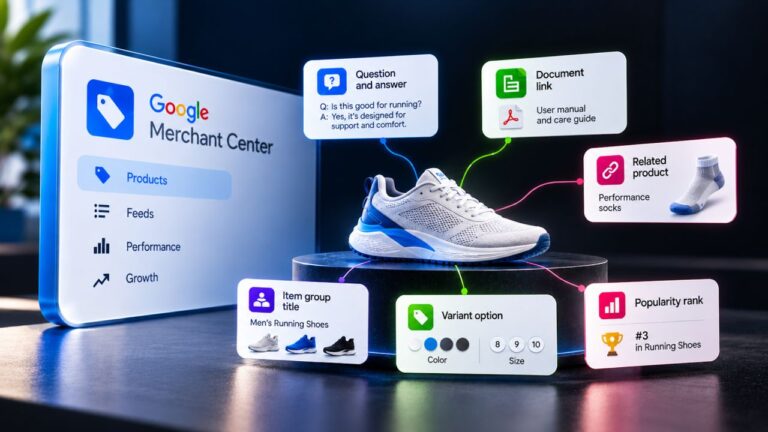
Google has published a new Merchant Center guide specifically for agencies, aimed at helping teams manage feeds, troubleshoot issues, and optimize Shopping setups at scale.
The guide pulls together best practices on account structure, product data quality, diagnostics and common errors with agency workflows and multi-client complexity in mind. It’s a practical resource to standardise how agencies onboard clients, fix feed problems and use Merchant Center tools more efficiently.
New page

Google has moved the Google Ads advertiser verification page to a new location in the Google Ads interface — now under Admin → Policy → Account instead of its previous spot.
The page is also renamed as part of a broader “Account” hub that centralizes verification, business info, certifications, and compliance tasks.
Thanks for sharing Barry Schwartz & Aditya shrivastava.
Expanding Shopping Ads

Google appears to be expanding Shopping Ads into the Image tab within Google Search.Shopping Ads are now being shown natively inside the Images tab on mobile, clearly marked as “Sponsored”.
This means product ads are no longer limited to the traditional Shopping or Search results.Thanks for sharing Thomas Eccel.
Meta

Google Ads has introduced a striking new feature.When editing assets in Performance Max and Demand Gen campaigns, Google Ads AI can now suggest video ads that originally ran on Meta platforms (such as Facebook).
Not pre-selecting

Emil Emanuel Ankjær Nordahl discovered that Google is not pre-selecting Performance Max anymore, when setting up a shopping campaign.
Picsart

Create, export, advertise in one flow.
Picsart has launched a direct integration with Google Ads.That means you can now go from finished creative to live ad assets without downloads, re-uploads or switching tools.
Next-Gen SDK

Google announced the Google Mobile Ads Next-Gen SDK for Android: a ground-up rewrite of the Google Mobile Ads SDK focused on faster load times, higher runtime stability and a cleaner developer integration model for in-app advertising on Android.
The SDK is currently available as an Open Beta and is planned to reach general availability in July 2026, according to Google. It supports both Google AdMob and Google Ad Manager.
Contact Form

Google Ads is retiring its traditional support contact form and replacing it with an AI-powered chatbot as the default first line of support for advertisers.
Instead of submitting a form and waiting for a human consultant, users are now routed to an AI assistant that tries to resolve issues, propose solutions, and surface relevant help documentation before escalating to a person if needed.
This marks a broader shift toward automation in Google Ads support workflows.
Thanks for sharing Marcin Wsół & Hana Kobzová.
Product view

Google Ads has rolled out a new product-level reporting view that finally shows how a single product performs across all campaigns in one place.
When you click a product in the Products tab, you now get a per-campaign breakdown for that exact item, including its individual metrics in every campaign where it runs.
Why this matters in practice:You can instantly spot which campaigns are actually driving value for the same product (and which are just spending).
This makes it much easier to clean up the overlap between Standard Shopping, PMax and other Shopping setups.
It also enables real product-level budget and structure decisions, instead of optimising only at campaign or asset-group level.
This finally makes cross-campaign product optimisation possible without exporting and stitching reports yourself.
Thanks for sharing Justin Jonkman
New page

Google Ads has quietly published new help pages that describe upcoming bulk-edit workflows for callout assets and structured snippet assets.
There’s no formal product announcement yet, but the documentation clearly points to bulk actions such as:
– find & replace across assets
– adding text at scale- changing case (capitalisation)
– editing multiple callouts and snippets in one go
For accounts with dozens (or hundreds) of callouts and structured snippets, this removes one of the most painful and time-consuming hygiene tasks in Google Ads.
Thanks for sharing Hana Kobzová
New Page

New: Google has published a new help page about the Google Ads Experiment Center a single hub for Experiments and Lift Studies.
Spotted by Hana Kobzová via PPC News Feed
Short takeaway: Google is clearly pushing advertisers to combine optimisation testing (Experiments) with real incrementality measurement (Lift studies) instead of treating them as separate workflows.
Looker Studio

Google has added true cross-source filtering in Looker Studio without requiring data blending first.
You can now apply one filter (for example country or campaign name) across multiple sources such as Google Ads, GA4 and Google Sheets by defining a shared ID via ID override.
Why this matters in practice:You no longer need fragile blends just to make basic cross-source filters work.
Dashboards become faster, cleaner and far easier to maintain, especially for multi-source PPC reporting setups.This is particularly useful for agency and enterprise reports where Ads + Analytics + external data live side by side.
How it works (short):You define a common field ID viaResource → Manage field names and IDs (ID override), and Looker Studio uses that shared ID to filter across sources.
Props to Vojtěch Audy & Hana Kobzová for sharing the update.
Week 5 finished