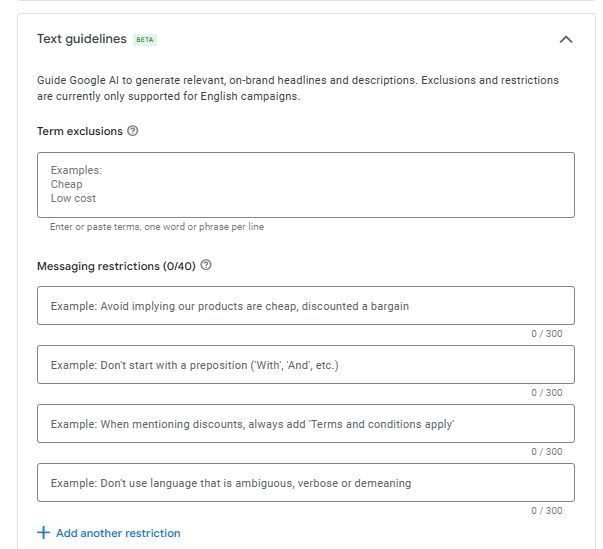
Google has expanded its Brand Guidelines and Asset Optimisation tools to include text guidelines, giving advertisers more control over automatically generated ad copy.
Previously limited to visual elements like logos and imagery, these sections now allow restrictions on certain words, phrases, or sentence starters (e.g., excluding “cheap” for premium brands, or banning openers like “and” or “with”).
When using Final URL expansion, opting into text customisation is required, making the feature more appealing as advertisers can now better control the messaging.
Up to 40 text restrictions can be set, available in both Brand Guidelines and Asset Optimisation sections.
Found by Birgul Woodford.

What changed
Google has added text guidelines to its Brand Guidelines and Asset Optimisation tools. Before, these tools only covered visual elements like logos and images. Now you can restrict certain words, phrases and sentence starters that appear in automatically generated ad copy. You can set up to 40 text restrictions.
What this means for ecommerce accounts
If you run Shopping or Performance Max campaigns, this matters most for ad copy that Google writes for you. Performance Max also serves Shopping ads, so changes like this usually reach both. You can, for example, stop words like "cheap" from appearing if your brand is premium. You can also ban sentence openers that do not fit your tone.
For Search campaigns, this update links this to Final URL expansion. Opting into text customisation is required when you use Final URL expansion. If you do not use Final URL expansion, this update does not say whether these settings change anything for you, so check how the tools apply in your account before relying on them.
What to do now
- Review the automatically generated headlines and descriptions in your Performance Max and Search campaigns to spot words or openers that do not fit your brand.
- List the words, phrases and sentence starters you want to avoid, such as discount terms that clash with a premium position.
- Add these as text restrictions in the Brand Guidelines or Asset Optimisation section, staying within the limit of 40.
- If you use Final URL expansion, check that you have opted into text customisation, since this update says it is required for that setup.
- Review the ads after a while to confirm the restrictions are working as you intended.
FAQ
What are text guidelines in Google Ads?
Text guidelines are a new part of Brand Guidelines and Asset Optimisation. They let you restrict certain words, phrases or sentence starters in automatically generated ad copy. Before this, the tools only covered visual elements like logos and imagery.
How many text restrictions can I set?
You can set up to 40 text restrictions. They are available in both the Brand Guidelines and Asset Optimisation sections.
Do I need to opt in to use text guidelines with Final URL expansion?
Yes. When you use Final URL expansion, opting into text customisation is required. This lets you control the messaging that Google generates for your ads.
Want this checked in your own account? I manage Google Ads for ecommerce brands that spend €10K or more a month. In a free 30-minute quick scan we look at your account together.
Book a free quick scanNew to a term? See the Google Ads glossary.